Reflection on Collaborative Group Process
Reflection On Group Process
Post University uses a group process in parts of the Master’s of Education program and this is reflected in the Wiki site. The group process is an interaction of parts of the course taken and a reflection of the process used to help each student apply knowledge in a viewed format.
In the Digitally Mediated Teaching and Learning module known as EDU_520_30 students were grouped in three to four interactive and collaborative settings using a Wiki site composed of an introduction, three pages of their digital mediated teaching and learning areas and reference page.
The process was interesting and our group was identified as: EDU520JUNEGRP2 as the title. The software was a totally new learning module to most students with challenges and our site and the areas of creation included our Home Page, Digital Fluency Page, Digital Access Page, Digital Security and Privacy, Discussion Page and a Reference Page.
In order to have all students on the same understanding of what was to be created, each student had to be assigned as specific task, one for Content Locator- Hannah, a second for Content Locator – Naomi, another for Site Designer and Organizer – Andrew and another for Multimedia and Graphics Designer – Crystol.
Some students seemed to have their data very quickly and posted either in digital video format and others posted in written format. We communicated daily and that part went smoothly. The issues of picture posting was done well except one student either did not choose to post or chose not to. The videos were created for each category and there seemed to be some confusion as to how many videos should be done for each page. This was a slight weakness of the project and there seemed to be confusion as to why some students posted and others posted then others posted nothing.
As sight designer, I tried to get the group to keep up each week through our discussion forum but it was generic and I believe people feared to express or excepted what was presented was fine.
The information presented was then compared to the larger class group and was commented on in that forum and positive responses seemed to be that were doing fairly well. The Project was informative and self-directed with students needing communication daily. This was slightly challenging as some people are better communicators then others but all in all was very useful and a good exercise.
Share this:
Home Page Wiki Site EDU520JUNEGRP2 Post University
Wiki Site Link: https://sites.google.com/view/edu520junegrp2/home
Online Identity ProposalAndrew Parrella EDU 520: Digitally Mediated Teaching and Learning
Dr. Michele Herrera
Proposal
Online Identity Proposal
When in the process of developing an online identity, one should first assess the online identity of others. This process will give positive examples of how to do things right, and make the user think about things to avoid based on how they perceive the online identity of someone else. The purpose of this paper is to propose two people with a strong digital presence to monitor and evaluate with hopes of gaining a broader understanding of online identity.
Subjects and Platforms
The two individuals that will be observed are Richard Byrne and William Kenyon. Byrne started an online web Blog named FreeTech4teacher in 2007. Byrne uses very organized colorful pictures which is readily visible and accessible to the reader. He uses such a wide range of subject matter one could literally spend hours visiting a linked website and simply search any area of subject interest from history, computers, animals, nature, games, food, and a range of so many things.
Bryne’s use of attractive pictures just draws the reader into wanting to investigate his website and although other websites and instructors has very unique options, his just shout out – click me! He has over 17 million views the site claims with a Facebook and twitter link two highly used platforms.
William Kenyon, a graduate student at Post University immediately had included his picture in his introduction with a visual connection which I could more easily associate a connection with and explained his varied background in date management and user platforms and advanced degrees. He seems to be ahead of the game, and I want to learn more about his user data and creations.
Proposal
As note from Zwilling’s (2015) 6 Keys to a Positive Online Presence and Reputation, online frequency of posts, content of post and collaboration with others seems to be brought about in both subjects.
Compiling of data for the two platforms the subjects use and how we interpret it from either a lay or professional way will be compiled through a spreadsheet in the following manner:
Platform data; Screenshot of Content; Impact Ease of Data Use.
This spreadsheet will show the how the online identity can make the user motivated to either access the data and show the online identity of the creator by highlighting his/her strengths and weakness in the profiles. Since this data is online and published it will record the growth or limitations of the online identity and enhance Zwilling, M. (2015) 6 keys to a positive online presence and reputation.
Online Identity Proposal
Andrew Parrella EDU 520:
Digitally Mediated Teaching and Learning
Dr. Michele Herrera
Online Identity Proposal
When in the process of developing an online identity, examples of positive online identity can demonstrate the portrayal of positive online presence and this development can help people to avoid pitfalls of negative aspects of perceived online identities.
The purpose of this paper is to propose two people with a strong digital presence to monitor and evaluate with hopes of gaining a broader understanding of online identity.
Subjects and PlatformsThe two individuals for the subject platform are Richard Byrne and Jeffrey Hamilton.
Byrne started an online web Blog named FreeTech4teacher in 2007. Byrne uses very organized colorful pictures which is readily visible and accessible to the reader. He uses such a wide range of subject matter one could literally spend hours visiting a linked website and simply search any area of subject interest from history, computers, animals, nature, games, food, and a range of so many things. Byrne’s use of attractive pictures just draws the reader into wanting to investigate his website. Although other websites and instructors have very specific options, his PLE just shouts out – “click me!” He has over 17 million views the site claims with a Facebook and twitter link two highly used platforms.
Jeffrey Hamilton is a co-worker in my current job of Marketing acting as the general manager of Mohegan Sun casino. Jeffrey gives a weekly operational update which is very inclusive with a live video on YouTube weekly. His presence is informative and positive in a one-to two-minute online duration. His picture and focus portray his positive visual presentation and profession connection with his audience mostly casino employees. He makes it easy and seamless recommendations by Zwilling.
This spreadsheet will show how the online identity can make the user motivated to either access the data under the user’s quest for information in that medium show the online identity of in his connection with a varied background of diverse employees. The user platform is a Facebook accessible internally accessed site provided by the casino. He has a broad following by employees and follows the casino brand through his online seamless interactions. The positive image is a profession blend of YouTube videos presented to the company and limited public accessed other mediums through the casino website. The blending of superior communication skills has branded him an online leader representative and portrays his own personal touch to the company and community through casino advertising and website.
As noted from Zwilling’s (2015) 6 Keys to a Positive Online Presence and Reputation, online frequency of posts, content of post and collaboration with others seems to be brought about in both subjects. Compiling of data for the two platforms the subjects use and how we interpret it from either a non-professional non-corporate setting or professional corporate or independent entrepreneur setting and following Zwilling’s recommendations will compared through a graph in the following manner: Platform data; Screenshot of Content; Impact Ease of Data Use; Rating Scale from 1 to 5 to the creator by highlighting his/her strengths and weakness in the profiles. Since this data is online and published it will record the growth or limitations of the online identity and enhance Zwilling, M. (2015) 6 keys to a positive online presence and reputation.
Graphing of Richard Byrne’s Online Presence and Online Frequency of Posting and Collaboration with others and Meeting of Zwilling’s 6 Keys to a Positive Online Prescence and Reputation Richard Byrne Positive Online Presence and Reputation Online Frequency of Post and Collaboration with Others Strengths Byrne is a very well-defined online Profile links to Twitter andFacebook42k subscribers and 17,795,583 views Growth Started in 2008 Presently growing and growing Limitations Audience geared toward education and teaching. Collaborates with several other professionals or community websites. Has playlists, videos as well. Weaknesses His only weakness would be to Extremely broad base and would keep up with his website, but he seems to be present and ongoing have to almost devote full time to this business only Zwilling’s 6 Key to Positive Presence and Reputation Meets Standard Scale 1: 2: 3: 4: 5Low to high Does not meet Standard Scale 1: 2: 3: 4: 5Low to high Claiming Identity: 5 1Actively Contribute to Profile Sites:5 1Add New (blog) Content 5 1Monitoring Web for Negativity: 5 1Actively removing unwanted Content: 5 1Live the Reputation desired Online: 5 1
EDU 520 Wiki Project
Hello EDU520 Group 2 and Class!
Our group consists of the following people and we are excited to create our learning site for this project:

Hannah Graham
Hi viewers! My name is Hannah Graham and I am one of the content locators for this Wiki site. Currently, I am a First Term Success Advisor at Post University. A big part of my job is helping nontraditional students get acclimated with using technology after being out of school for many years. I am also a full-time student at Post University, working towards a M.Ed. in TESOL. In my personal life, I live with my husband Noah (also an advisor at Post!), my task-trained service dog Tori, and my pet dog Penny. We live in Northern Michigan and enjoy a variety of outdoor activities together such as skiing, bicycle riding, and fishing. When indoors, I spend my time learning new skills, baking sourdough, and reading. I hope you enjoy reading the content of our Wiki site. If you have any questions, feel free to reach out to me at hannaha13097@gmail.com.

Crystol Thomas
Hello, my name is Crystol. I am a mother of one. This is my first term at Post University. I am currently a 7th grade Math teacher, this will be my third year teaching. I am excited to be apart of Post and anticipate to learn more and more throughout my journey here.

Andrew Parrella
Hello all- I am Andrew Parrella. I am the site designer and organizer. I currently work at Mohegan Sun as an Executive Host helping people with their everyday entertainment needs from concert booking to hotel stays and overall guest experience. I am University of Connecticut graduate with a BA in English and have been teaching in many capacities in local school systems, hospital settings while also working in finance in banking and retail over the years. I am a writer and teacher by trade but also love animals- two cats Charmay a female black and white cat and Scooter a male gray tabby. I live in Connecticut and have been a city councilor here and also am a political activist locally serving on many different boards and commissions from Inland Wetlands to currently our Beautification Committee. I am very excited to be part of the Post family and please reach out if any questions. andrewparrella44@gmail.com
Learning is a lifelong commitment!
Naomi Kissoon
Hello, My name is Naomi Kissoon. I am also one of the content locators for this wiki site. I have not been in school for 22 years, I graduated with my Bachelor in 2000. I have two boys ages 4 and 2. I am a real estate agent. My boys occupy most of my time. I spent most of my years after my bachelor, working. Now, my boys and their future are my main focus. I am home and enjoying my moments with them.
Digital Fluency
Digital Fluency
About
Digital fluency is the result of extensive experience using technology in a variety of settings. There are many components of digital fluency, but the most prominent markers are the ability to navigate technology quickly, accurately, and efficiently with flexibility. In general, digital natives are more likely to be digitally fluent, given the major role using technology plays in their life as they develop. Ursinus College (2022) describes this by stating “the path to becoming a digitally fluent individual is an ever-evolving, iterative process that begins with assessing and developing one’s digital literacy and information literacy skills” (para 2). Other skills and attitudes encompass digital fluency as well. Some of these include: understanding digital safety and privacy, navigating online discussions with civility, and persevering in the face of challenges and setbacks (troubleshooting).
Importance of Digital Fluency
Digital access is a prerequisite for digital fluency to form. As with any type of fluency, it takes quite some time to be digitally fluent. In order to be competitive in the job market, digital fluency is mandatory. Likewise, in order to fully engage in our online society, digital fluency is mandatory. Without the ability to navigate technology fluently, many key parts of modern life are not able to be enjoyed fully. While it may sound the same as digital literacy, digital fluency requires a step further in mastery. Sparrow (2018) describes it by stating the following:
In learning a foreign language, a literate person can read, speak, and listen for understanding in the new language. A fluent person can create something in the language: a story, a poem, a play, or a conversation. Similarly, digital literacy is an understanding of how to use the tools; digital fluency is the ability to create something new with those tools. (para 3)
To put it simply, digital fluency is important because it allows for the advancement of technology as opposed to simply the use of it. As a society that strives for greater discoveries and inventions, digital fluency allows the user to fully engage in the development of making the future become the present. This is incredibly appealing to companies, schools, and organizations, as being digitally fluent is, quite simply, investable. Check out the TedX Talk (2020) by Dr. Itoro Emembolu for a deeper dive into this topic!
Classroom Implications
In the classroom, the first thought automatically goes back to the importance of digital access. Without consistent access, fluency cannot develop. Once regular access to technology is received, the next piece is consistent use of technology. Students should be exposed to a variety of technologies and softwares and given level-appropriate challenges in using it for various purposes. When looking to develop fluency, open-ended activities are best, as they promote creativity and flexibility. Price-Dennis, et al. (2015) describes this type of teaching in their classroom by stating “we designed an inquiry that explored topics such as diversity and equity while including hybrid digital tools such as blogs, apps…to promote a learning environment steeped in critical thinking, collaboration, and expansive ways of conceptualizing written and oral communication” (section 3). These types of activities should increase in complexity as the students increase in ability, always providing a manageable challenge. Likewise, a time should always be given for structured reflection on the activity or project. There are countless resources on building digital fluency in the classroom. Please see below for a small list and explore the web for countless other excellent ideas!
Resources on Digital Fluency
- Code.org– this is a free website that houses a full teaching curriculum across grade levels for students to learn coding skills.
- Class Dojo– this is a classroom community building platform that allows students to interact with one another in a safe, monitored way that focuses on building healthy citizenship skills.
- 14 Digital Literacy Resources to Bookmark– this is a list of 14 resources to build digital literacy in the classroom, all of which are free for educators.
- US Digital Literacy– this is a website that features countless digital literacy resources, including free toolkits, lessons, and strategies that can be used in the classroom.
A Video on Digital Fluency for Reflection …..
A Video on Digital Fluency for Reflection by Andrew Parrella
Another viewpoint on Digital Fluency by Andrew Parrella
Digital Access
Digital Access
About
Digital access refers to the distribution of technology and considers the factors that result in a lack of equitable opportunities. Many factors may limit or enhance the likelihood of access to technology and digital tools. One of the primary limiting factors is location. Urban populations tend to have greater access to wireless internet, whereas individuals living in rural settings have limited options, often having to depend on less reliable internet such as satellite or DSL. Another major factor is socioeconomic status, often limiting the technology that the users can purchase. Given how expensive devices can be, many individuals are unable to purchase laptops, tablets, smartphones, etc. In addition, education on how to use technology is not always accessible and also follows the trend of being limited for those with low socioeconomic status and those living in rural areas.
Importance of Digital Access
When thinking about the importance of digital access, it is vital to think about digital inaccessibility and the digital divide. According to the National League of Cities (n.d.),
The digital divide is the gap between individuals who have access to computers, high-speed internet and the skills to use them, and those who do not. This gap shows up in various ways in our communities: broadband access and connectivity can fuel economic, educational, health and social outcomes. (para 3)
Without proper access to technology, it can prove difficult for individuals to properly participate in our world. As we push more towards a digital-centered world, it is increasingly disadvantageous to populations that have limited access to technology. Whether working remotely or even working in person, jobs have shifted, being technology-centered and digital fluency is a requirement. The Patterson Foundation (2022) describes the importance of digital access by stating “at the individual level, digital access enhances or constrains opportunities for participation in modern society. At the community level, it is evolving as a measure of community health and vitality.” (section 3).
Classroom Implications
Inequality with digital access is also an issue in schools across the US. Schools emulate society and are tasked with preparing children to be productive citizens. Now, one of the biggest components is for students to learn how to be productive digital citizens. American University’s School of Education (2020) describes the basis of the issue of digital inequity in schools by stating “since schools are funded through local property taxes, the schools in low-income areas didn’t have as much money to spend on technology as those in high-income communities”. (section 3). While many schools in privileged communities celebrate 1-1 laptops and iPads along with an array of smart boards, display cameras, and coding technologies, many schools in underprivileged communities struggle to share a few computers in a class of over 30 students. This is a clear depiction of inequity in education based on the digital divide. Check out the YouTube video below for a TedXYouth discussion on digital access in schools!
Digital Access Resources
- 19 Technology Grants and Organizations to Help Expand Your Classroom– a website that details 19 different options for funding your classroom in order to acquire technology.
- Affordable Connectivity Program– a website that describes the Affordable Connectivity Program, which helps low-income families secure an internet connection.
- Looking for a Free Laptop? How Low-Income People Can Apply– a blog page that details programs that can help low-income families get a laptop for free or at a low cost.
Digital Security and Privacy
Privacy and Security
Privacy and security are somewhat interrelated with each other. Digital security is necessary in todays digital age. We do our personal and business transaction online, information is stored in our phones, apps etc. We receive digital messages either by text or email. Our personal information must be kept private. Therefore, digital security is the process of protecting ones online identity. According to the article titled, “Digital Security Versus Private Information,” (Ghauri, A. F., p16) states, “Digital security is essential to trust in this digital age. Within this environment, digital security is the policy and framework that proved the essential and practical principles to address without restricting use, the openness of digital technology, and dynamic nature without inhibiting the potential to foster innovation to the social technologies.” Its important for both security and privacy to be maintained.
Privacy vs Security
Privacy is often associated with certain rights which may control some personal information. Security means protecting certain information relating to privacy policies. (Ghauri, A. F., p. 11) stated that digital security and privacy policy can be considered the priority of different public policies in the era of a data-dependent economy. The main challenge of business, government, and other organizations are to manage the risks related to the private information of any organization.
Security Risk
There are nine different types of security risk that can damage computer hardware, software, and our private data, also data within an organization. All computer security are referred to as digital risk that can causes damages to businesses and organizations. The security risks that are discussed by (Ghauri, A. F., p. 12) are as follows: data, cybersecurity, reputational, talent storage and cultural, privacy, third party, technology, artificial intelligence and compliance’ risks.
Data risk– associated with the misuse of sensitive business data and even customer data.
Cybersecurity risk– is associated with the connection to the internet in compromising network, most common is ransomware attacks.
Reputational risk– the decreasing of the valuation of a company. This is referred to as the downfall of its reputation because of some type of business plan failing.
Talent storage and cultural risk-lack of a skillful workforce, leading to a slow business growth. Culture is associated with the values, attitudes and behavior of team members.
Privacy risk– storage of personal and private information. Information must be stored correctly.
Third Party risk-potential treat of digital security concept that are presented to employees of an organization. Also pertains to sensitive customer data.
Technology risk- disruption of technology, associated with cyber attacks. service outrages, password theft etc.
Artificial intelligence risk– compromising the integrity of artificial system, choices are not made according to its design.
Compliance risk– security compliance, the meeting of various controls and the availability of data.
Managing Digital Security Risk
In managing and maintaining security risk there are some mitigation strategies that was developed. (Ghauri, A. F. p12-13) listed the strategies as identifying the key assets, understanding the potential treats, monitoring the unwanted exposure and taking action against the risks.
Privacy and Security For Digital Technology
Integration in the Classroom
Schools everywhere in the United States uses Google, Microsoft, and Apple tools within the classrooms. Educators need to be trained in using these applications for enhancing students learning. This is where, I can understand why we are being introduced to all these online tools and applications, if we are not trained in using digital technology, there would be concerns relating to privacy and security. According to the article titled, “Privacy and Security Considerations For Digital Technology Use in Elementary Schools,” (Kumar, P. C., Chetty, M., Clegg, T. L., Vitak, J.), stated that schools can play an important role in helping children develop privacy and security skills. There are resources available in schools to teach children privacy and security, but they do not receive lessons on privacy and security. Therefore, there’s not much attention given in classrooms on privacy and security, especially in elementary schools.
References
Ghauri, Faysal. A. (2021). Digital Security versus private information. Journal of Computer science ijcsid. International Journal of Computer Science and Information Security. ACADEMIA
Kumar, P. C., M., Clegg, T.L., Vitak, J.(2019). Privacy and Security Considerations For Digital Technology Use in Elementary Schools. In CHI Conference on Human Factors in Computing Systems Proceedings. 1-13, Glasgow, Scotland UK. ACM, New York, NY, USA. http://doi.org/10.1145/3290605.3300537.
Regan, PIn .M., FitzGerald, G & Balint, P. (2013). Generational views of information privacy? Innovation: The European Journal Of Social Sciences, 26(1/2),81-99. doi: 10.10.1080/13511610.2013.747650.
Written by Naomi Kissoon
Check out the video below by TedX Talks (2018) for more information on this topic! Nick Espinosa, an expert at cybersecurity and network infrastructure, lays out five laws of cybersecurity.
Cyberbullying
What is Cyberbullying –
Cyberbullying is a form of harassment and this type of aggressive behavior which can be repeatedly done by one person to another a termed bullying. Over time, bullying is thought to be violent in that the physical and/or psychological abuse to an individual who cannot defend him/herself is insidious. “Longstanding violence, physical or psychological, conducted by an individual or a group directed against an individual who is not able to defend himself in the actual situation.” Roland (1989) [2:21]
Scandinavian researcher Dan Olweus, also classifies and defines defines bullying as “aggressive behavior that is intentional and that involves an imbalance of power. Most often, it is repeated over time.” Olweus (1978-1993) [3-5]
As defined by The Centers for Disease Control and Prevention, the Department of Education and the Health Resources and Services Administration, the uniform definition of bullying is as follows:
Bullying is any unwanted aggressive behavior(s) by another youth or group of youths who are not siblings or current dating partners that involves an observed or perceived power imbalance and is repeated multiple times or is highly likely to be repeated. Bullying may inflict harm or distress on the targeted youth including physical, psychological, social, or educational harm. (Centers for Centers for Disease Control and Prevention, the Department of Education, and the Health Resources and Services Administration (2014) [8]
Many of this bullying may unintended as hence laws that have elements of intent to cover them.
“For example, Delaware law characterizes bullying as an ‘intentional written, electronic, verbal or physical act.’ (Delaware State Code. Title 14: Education, Free Public Schools, (2014) [9]
“Louisiana defines cyberbullying as ‘the transmission of any electronic textual, visual, written, or oral communication with the malicious and willful intent to coerce, abuse, torment, or intimidate a person.’” Louisiana State Legislature. La. Rev. Stat. (2014) [10]
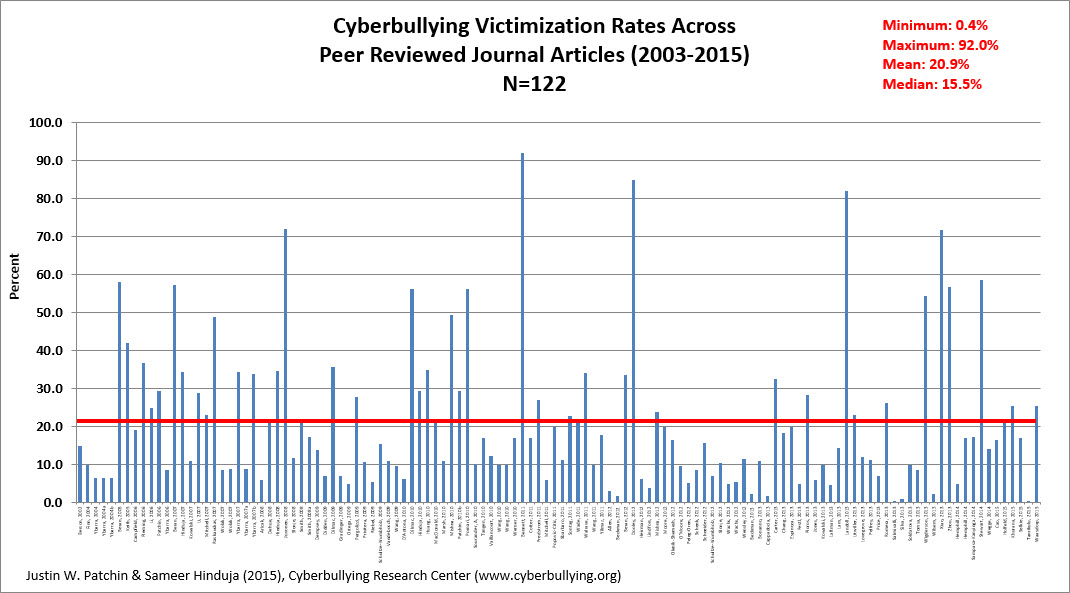
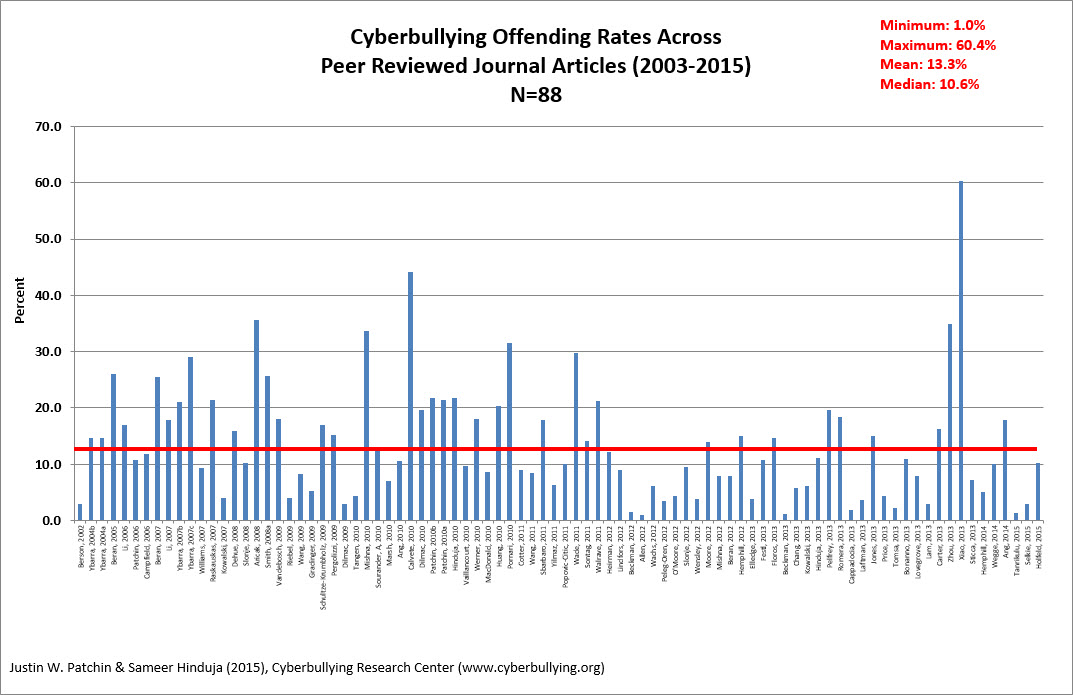
The majority of bullying incidents can and should be handled outside of the formal law. The point is that most academic and legal definitions of bullying include intent. (Hinduja, S. & Patchin, J. W. (2015).
Whethor the bullying is direct or indirect the act of agression and the whethor it is malicious such as acts of aspects like verbal violence ie: teasing, taunting, threateneing, etc., are all to be considered when behaviors become destructive to another individual. Peer harrassment especially repetitive in nature can be a clarifying issue when determining if bullying is happening and how severe it becomes or damage done to another individual. “Overt aggression might involve name-calling, pushing, or hitting, while relational aggression includes gossip, rumor spreading, social sabotage, exclusion, and other behaviors destructive to interpersonal relationships. (Hinduja, S. & Patchin, J. W. (2015). [18-22]
Even gossip, rumor spreading, social sabotage, exclusion and interpersonal destructive behaviors happening could be forms of bullying.
The days when people avoided classmates by dodging them at school because they feared the bully take away from productive and quality school experience and can happen in the work place as well.
Power by the person initiating the bullying over the target or victim. This can range from any particular social connection such as class structure, age, race, sex, ethnicity, or monetary status. Technology can be used by the bully to “imbue a person with power over another.” (Hinduja, S. & Patchin, J. W. (2015). [3,5,23-26]
Do you personally remember choosing to go down different hallways or to show up to class right when it began instead of early to avoid spending unnecessary “quality time” with someone who always hassled you? We vividly recall instances from our middle school days that taught us the art of skillfully dodging any run-ins with the bullies in our respective lives.
Being knowledgeable on accounts properly set up to protect people using them from hurtful content is paramount to a person being protected from bullying.
References
Excerpted from: “Bullying Beyond the Schoolyard: Preventing and Responding to Cyberbullying”
Hinduja, S. & Patchin, J. W. (2015). Bullying Beyond the Schoolyard: Preventing and Responding to Cyberbullying (2nd Ed.). Thousand Oaks, CA: Sage Publications.
Cyberbullying Research Center; http://cyberbulling.org/what-is-bullying
Written by Andrew Parrella
Resources
Here some educational links regarding cyberbullying:
Educator Briefing: Beginner (cyberbullying.org)
Written by Andrew Parrella
Digital Security and Privacy
Privacy and Security
Privacy and security are somewhat interrelated with each other. Digital security is necessary in todays digital age. We do our personal and business transaction online, information is stored in our phones, apps etc. We receive digital messages either by text or email. Our personal information must be kept private. Therefore, digital security is the process of protecting ones online identity. According to the article titled, “Digital Security Versus Private Information,” (Ghauri, A. F., p16) states, “Digital security is essential to trust in this digital age. Within this environment, digital security is the policy and framework that proved the essential and practical principles to address without restricting use, the openness of digital technology, and dynamic nature without inhibiting the potential to foster innovation to the social technologies.” Its important for both security and privacy to be maintained.
Privacy vs Security
Privacy is often associated with certain rights which may control some personal information. Security means protecting certain information relating to privacy policies. (Ghauri, A. F., p. 11) stated that digital security and privacy policy can be considered the priority of different public policies in the era of a data-dependent economy. The main challenge of business, government, and other organizations are to manage the risks related to the private information of any organization.
Security Risk
There are nine different types of security risk that can damage computer hardware, software, and our private data, also data within an organization. All computer security are referred to as digital risk that can causes damages to businesses and organizations. The security risks that are discussed by (Ghauri, A. F., p. 12) are as follows: data, cybersecurity, reputational, talent storage and cultural, privacy, third party, technology, artificial intelligence and compliance’ risks.
Data risk– associated with the misuse of sensitive business data and even customer data.
Cybersecurity risk– is associated with the connection to the internet in compromising network, most common is ransomware attacks.
Reputational risk– the decreasing of the valuation of a company. This is referred to as the downfall of its reputation because of some type of business plan failing.
Talent storage and cultural risk-lack of a skillful workforce, leading to a slow business growth. Culture is associated with the values, attitudes and behavior of team members.
Privacy risk– storage of personal and private information. Information must be stored correctly.
Third Party risk-potential treat of digital security concept that are presented to employees of an organization. Also pertains to sensitive customer data.
Technology risk- disruption of technology, associated with cyber attacks. service outrages, password theft etc.
Artificial intelligence risk– compromising the integrity of artificial system, choices are not made according to its design.
Compliance risk– security compliance, the meeting of various controls and the availability of data.
Managing Digital Security Risk
In managing and maintaining security risk there are some mitigation strategies that was developed. (Ghauri, A. F. p12-13) listed the strategies as identifying the key assets, understanding the potential treats, monitoring the unwanted exposure and taking action against the risks.
Privacy and Security For Digital Technology
Integration in the Classroom
Schools everywhere in the United States uses Google, Microsoft, and Apple tools within the classrooms. Educators need to be trained in using these applications for enhancing students learning. This is where, I can understand why we are being introduced to all these online tools and applications, if we are not trained in using digital technology, there would be concerns relating to privacy and security. According to the article titled, “Privacy and Security Considerations For Digital Technology Use in Elementary Schools,” (Kumar, P. C., Chetty, M., Clegg, T. L., Vitak, J.), stated that schools can play an important role in helping children develop privacy and security skills. There are resources available in schools to teach children privacy and security, but they do not receive lessons on privacy and security. Therefore, there’s not much attention given in classrooms on privacy and security, especially in elementary schools.
References
Ghauri, Faysal. A. (2021). Digital Security versus private information. Journal of Computer science ijcsid. International Journal of Computer Science and Information Security. ACADEMIA
Kumar, P. C., M., Clegg, T.L., Vitak, J.(2019). Privacy and Security Considerations For Digital Technology Use in Elementary Schools. In CHI Conference on Human Factors in Computing Systems Proceedings. 1-13, Glasgow, Scotland UK. ACM, New York, NY, USA. http://doi.org/10.1145/3290605.3300537.
Regan, PIn .M., FitzGerald, G & Balint, P. (2013). Generational views of information privacy? Innovation: The European Journal Of Social Sciences, 26(1/2),81-99. doi: 10.10.1080/13511610.2013.747650.
Written by Naomi Kissoon
Check out the video below by TedX Talks (2018) for more information on this topic! Nick Espinosa, an expert at cybersecurity and network infrastructure, lays out five laws of cybersecurity.
Cyberbullying
What is Cyberbullying –
Cyberbullying is a form of harassment and this type of aggressive behavior which can be repeatedly done by one person to another a termed bullying. Over time, bullying is thought to be violent in that the physical and/or psychological abuse to an individual who cannot defend him/herself is insidious. “Longstanding violence, physical or psychological, conducted by an individual or a group directed against an individual who is not able to defend himself in the actual situation.” Roland (1989) [2:21]
Scandinavian researcher Dan Olweus, also classifies and defines defines bullying as “aggressive behavior that is intentional and that involves an imbalance of power. Most often, it is repeated over time.” Olweus (1978-1993) [3-5]
As defined by The Centers for Disease Control and Prevention, the Department of Education and the Health Resources and Services Administration, the uniform definition of bullying is as follows:
Bullying is any unwanted aggressive behavior(s) by another youth or group of youths who are not siblings or current dating partners that involves an observed or perceived power imbalance and is repeated multiple times or is highly likely to be repeated. Bullying may inflict harm or distress on the targeted youth including physical, psychological, social, or educational harm. (Centers for Centers for Disease Control and Prevention, the Department of Education, and the Health Resources and Services Administration (2014) [8]
Many of this bullying may unintended as hence laws that have elements of intent to cover them.
“For example, Delaware law characterizes bullying as an ‘intentional written, electronic, verbal or physical act.’ (Delaware State Code. Title 14: Education, Free Public Schools, (2014) [9]
“Louisiana defines cyberbullying as ‘the transmission of any electronic textual, visual, written, or oral communication with the malicious and willful intent to coerce, abuse, torment, or intimidate a person.’” Louisiana State Legislature. La. Rev. Stat. (2014) [10]
The majority of bullying incidents can and should be handled outside of the formal law. The point is that most academic and legal definitions of bullying include intent. (Hinduja, S. & Patchin, J. W. (2015).
Whethor the bullying is direct or indirect the act of agression and the whethor it is malicious such as acts of aspects like verbal violence ie: teasing, taunting, threateneing, etc., are all to be considered when behaviors become destructive to another individual. Peer harrassment especially repetitive in nature can be a clarifying issue when determining if bullying is happening and how severe it becomes or damage done to another individual. “Overt aggression might involve name-calling, pushing, or hitting, while relational aggression includes gossip, rumor spreading, social sabotage, exclusion, and other behaviors destructive to interpersonal relationships. (Hinduja, S. & Patchin, J. W. (2015). [18-22]
Even gossip, rumor spreading, social sabotage, exclusion and interpersonal destructive behaviors happening could be forms of bullying.
The days when people avoided classmates by dodging them at school because they feared the bully take away from productive and quality school experience and can happen in the work place as well.
Power by the person initiating the bullying over the target or victim. This can range from any particular social connection such as class structure, age, race, sex, ethnicity, or monetary status. Technology can be used by the bully to “imbue a person with power over another.” (Hinduja, S. & Patchin, J. W. (2015). [3,5,23-26]
Do you personally remember choosing to go down different hallways or to show up to class right when it began instead of early to avoid spending unnecessary “quality time” with someone who always hassled you? We vividly recall instances from our middle school days that taught us the art of skillfully dodging any run-ins with the bullies in our respective lives.
Being knowledgeable on accounts properly set up to protect people using them from hurtful content is paramount to a person being protected from bullying.
References
Excerpted from: “Bullying Beyond the Schoolyard: Preventing and Responding to Cyberbullying”
Hinduja, S. & Patchin, J. W. (2015). Bullying Beyond the Schoolyard: Preventing and Responding to Cyberbullying (2nd Ed.). Thousand Oaks, CA: Sage Publications.
Cyberbullying Research Center; http://cyberbulling.org/what-is-bullying
Written by Andrew Parrella
Resources
Here some educational links regarding cyberbullying:
Educator Briefing: Beginner (cyberbullying.org)
Written by Andrew Parrella
Discussion
Roles
Content Locator #1- Hannah
Content Locator #2- Naomi
Site Designer and Organizer- Andrew
Multimedia and Graphics Designer-Crystol
Topics
Topic #1- Digital Access
Topic #2- Digital Security and Privacy
Topic #3- Digital Fluency
Hannah Graham: Hi guys! I think we should all use different colors so that we will know who posted which idea. I’ll use red for mine! That’ll make it easier to keep track of! For roles, I would love to be one of the content locators. I feel like that one might need two people to work on it, as it is the heaviest of the roles. What do each of you think? Also, one topic I would love to research is digital access. I know there’s only 3 topics and 3 roles, but everyone else feel free to claim a topic and role and we will go from there! Let’s also date our messages so that we can keep track of the discussion over time, which is part of the grading criteria. 7/22/22
Naomi Kissoon: Thanks Hannah for setting up this discussion page and responding to my email. I had no clue to setting up this page. I would like to be content locator #2. I have chosen digital security and privacy as one of the three topics to do my research. 7/23/22
Hannah Graham: Sounds like a game plan, Naomi! Have you been in touch with the other group members? I am going to try to comment on their discussion board posts and let them know that we are using this section of our Wiki site to get started choosing roles and topics! 🙂 7/23/22
Naomi Kissoon: I did contact Andrew by email three days ago. He responded, stating, ” What topic, I would like to work with?” He also stated that his google email was not working. Hannah, we are going to create other pages with our topic as we start our group project. Also, if I have any question about using wiki, I will ask you. I am a little afraid to play around with wiki. 7/24/22
Crystol Thomas: Hi guys! I struggled trying to find this discussion and I had sent out in email to everyone a few days ago a well. I hope everyone is doing ok. I chose to be the multimedia and graphics designer. I have chosen digital fluency as one of the topics to research 7/24/22.
Hello all:
I finally see my email now but glad you did get it back Naomi-
I am fine with the three chosen: Access, Security & Privacy and Fluency – I would be happy to help design this and do all the others with all of you as well as we find graphics, content and mulitimedia designs as well for the site design.
This should be a bit of a challenge but fun also.
I will try to use green for Irish and Italian if that’s ok! LOL!
I added a littler color to our banner – hope you like it…..
7:42 pm
Andrew Parrella
Hannah Graham: Perfect! Let’s get started on the next stage of our project ASAP. I think we are supposed to communicate at least 4 days per week moving forward, so we should be able to get a good start on the next step after unit 5 opens! So excited to work with each of you! 7/24/2022
Andrew:
Hello all: I am going to attempt to create the five pages as per instructions and rubric so bear with me as I try this – and please correct me and let me me know what you like or don’t when done….7/26/2022
Hello again – Just created four pages for us: Title, Topic One Page, Topic Two Page, Topic Three Page, and Reference Page
7/27/2022
Will check in again later today. Please let me know if any of you have any ideas or need any help.
Andrew:
Please let me know if anyone has any content they want me to organize. I will monitor this later today and over the next few days.
7/27/2022 3:15pm
Hannah: Hi everyone! Thank you, Andrew, for stay on top of this and keeping us organized! I’m going to get started creating content for the Digital Access and Digital Fluency pages right now. I will keep you updated on my progress. 🙂 7/27/22
Naomi: Hi everyone, I am sorry, but I only seeing the home and discussion page.
Andrew, I am not able to see any other pages . I am sending you an email. 07/28/2022 11:06 am.
Andrew: Go to Home page click there 7/28/2022 (2:18pm)
Andrew: Go to Home page click there 7/28/2022 (2:18pm)
Instructions:
Click under Home page left right
Click under Discussion
Click under Home again
Menu will drop down to pages
Pick Page desired.
Hope that helps. 7/28/2022 at 5:13pm
Please let me know when anyone has anything concerning out three themes they wish to put on the page or download such as images, etc. 7/28/2022 5:19pm
Naomi: Thanks Andrew. I got it. I am starting on Page 2 with digital securtiy and privacy. 07/29/22
Hannah: Hi everyone! I just added the content to the digital access and digital fluency pages. Let me know what you think! We all need a short “about me” for the home page added by Sunday. Also, Naomi, please add your references to the references page in alphabetical order 🙂 7/30/22
Naomi: Very nicely done Hannah, but one mistake under the content Digital Fluency, you talked about Digital Access and under Digital Access, you talked about Digital Fluency. You just have to switch the pages to the right content. I will add my references. 07/30/2022
Andrew: Hello all- I created a second discussion page 2 for general communication as well as the first page was running out. Still learning all this software. Hope you all have a good night. 9:58pm 7/30/2022.
Crystol- Good day everyone! I see the pages that have been created. Nice job ! I will go ahead and add some media to the content you guys have posted so far. Also, if you guys can email a picture of each of you so I can add it to the home page that would be great. 7/31/22
Hannah: Got it all fixed! Thanks for catching that! Sorry for a late response, I have been in the hospital. I will get that picture emailed to you right now, Crystol! 7/31/22 UPDATE: Just sent the pic! Let me know if you need anything else! Thanks!
Andrew: Hello everyone- The profile pictures look great – I will see what I can get downloaded as well. 10:54 am 8/1/2022
Naomi: Crystol; There is no video posted. I see you placed something on digital privacy and security page stating, “check out this video.” Can you please repost. Thanks! 08/01/22
Hannah: Hi everyone! Each of us has to choose a topic to create a video on for this week’s assignment. I am choosing Digital Access to create a video on. Which topic do each of you want to create a video on? 8/3/22
Crystol: Hi Hannah, I am completing my video on Digital Fluency. 8/3/22
Andrew: I am leaning to a video on Digital Security and Privacy – 8/3/2022
Andrew: I just updated the Digital Security and Privacy page for some spell checks and appreciate the data that was done on that – Does anyone have any other videos to add to our pages? If so, we can create a digital page for this or wait for our Youtube videos to help assist with other information we want to include on the Wiki site. Have a great day all. 8/3/2022 5:47pm
Naomi: Thank you Andrew for the editing. I may need help on embedding the YouTube video on Digital Security and Privacy on to this project. But, I want to practice on creating and editing on Powtoon a little more. 08/04/22
Andrew: Hi Naomi- ok sounds good we can always have you email me at: andrewparrella44@gmail.com or if someone is better at downloading then simply follow the download as we would need this in the next three days. Any other visual content would be good as well as we definitely need it. Thanks! I am going to be working on some visuals but if anyone has sound availability as my computer speakers are now working as of right now. Thank you all. We need each of three areas of an outside visual Fluency, Access, Security and Privacy for those pages. More then one type would be really fantastic! Don’t forget our Reference pages.
Naomi: I will download my YouTube video later tonight. I just have to add in the references and export it on to YouTube. 08/06/22
Hannah: Hi everyone! The videos look good, just make sure that we can access them and that they meet the criteria! To check and make sure the video will play, open an incognito tab in a browser and paste the link to your video. This will show if everyone else can access it. Also, let’s try to get our videos to around 1 minute, like the guidelines say. My video is a little over, but I think we should shoot for under 2 minutes. I am going to get mine embedded tomorrow, it would be great if we can all try to get them in a touch early tomorrow, if possible! Hope everyone is having a great weekend! 8/6/22
Naomi: Thanks, Hannah. I just embedded mine. 08/07/22.
Hannah: Just finished embedding my video! If anyone needs help, just let me know! 🙂 8/7/22
Naomi: Hi everyone, I see that our work have been published. I have posted our site to share with our classmates for feedbacks! 08/10/22
Hannah: Hi Naomi, thanks for sharing our link on the discussion board! Let’s try to monitor the feedback and make the changes that we can throughout the week. Hope everyone is having a good week 7 of classes so far! 8/10/22
Andrew:
Hello all- just checking in here and open to some video suggestions so we can keep adding to this site. Please let me know who feels the most comfortable with YouTube as this is my challenge for this class. Everyone is so helpful – always open to some new suggestions. 8/11/2022
Naomi: Hi Crystol, I hope all is well. Is it possible that you can help me with the allignment of the topic on digital security. I am having trouble with allignment. I will try until I get it. But, just in case, I will apreciate the help. 08/12/22.
Andrew:
Hi Naomi- Let me see what I can come up with however keep trying it to center the titles under the alignment bar. Any chance of downloading a picture? It would really add to the site? Thanks- Mine was bit of a challenge and I had to save to a file then upload. Anyone that can help with YouTube videos as I need help on that….thanks all. 8/13/2022 2:20pm
I centered the titles for Digital Security however try to use spell check before download as this system seems to not have that option. Please let me know if anyone finds the spell check option. Thank you! 8/13/2022 2:30pm
Hannah: Hi everyone! Is there any way we can condense so that we only have one digital security page? I think that would look better than 3 separate pages and I think we are only supposed to have one page for each topic. Let me know what you think 🙂 8/13/22
Andrew:
Hi Hannah –
I will try to reorganize the pages but hopefully the order posted will not be wrong as we seemed to run out of posting ability when our page was full. Will see what we can do…. 8:28pm on 8/13/2022
Andrew –
Hi Everyone-
I eliminated the three discussion pages and they are now condensed under one page. If anyone has more videos feel free to download and we can really make this site even better. 8:58pm 8/13/2022
Hannah: That looks great, Andrew! I read all of the feedback we have received so far and made any changes that weren’t already made at the time I checked the discussion board. Let me know what you all think. Let’s all do a final walkthrough of our site from a viewer’s perspective and if everyone could post in here when finished, that would be great so that we will know when everyone is satisfied with our end product and ready for us to begin to submit the final link! Great job, everyone! 8/14/22
Naomi: Thanks, it looks great! It was really nice working with you both. 08/14/22
Hannah: It has been nice working with you as well, Naomi, as well as everyone else! Hopefully we will have the chance to collaborate again in the future! 8/14/22
Crystol: Yes Andrew, I will help, sorry for the delayed response. It was great working with all of you !
Andrew:
Thank you all for you help and perseverance. I added some color to some profiles obviously to enhance our visual and if anyone has anything to add such as pictures of more video clips, please add and we can review end of week. This was fun and challenging project! Learning something new everyday! 8/16/2022 4:04pm
Andrew:
Hello all- I added another video on Digital Fluency. If anyone has more to add please as we have a limited time to make this site even better. It has been wonderful to work with all of you. 8/19/2022 2:03 am
References
References
American University’s School of Education. (2020, December 15). Understanding the digital divide in education. AU School of Education. https://soeonline.american.edu/blog/digital-divide-in-education
NLC. (n.d.). Digital equity playbook: how city leaders can bridge the digital divide. National League of Cities. https://www.nlc.org/resource/digital-equity-playbook-how-city-leaders-can-bridge-the-digital-divide/
Price-Dennis, D., Holmes, K. & Smith, E. (2015). Exploring digital literacy practices in an inclusive classroom. Reading Rockets. https://www.readingrockets.org/article/exploring-digital-literacy-practices-inclusive-classroom
Sparrow, J. (2018, March 12). Digital fluency: preparing students to create big, bold problems. Educause Review. https://er.educause.edu/articles/2018/3/digital-fluency-preparing-students-to-create-big-bold-problems
TEDx Talks. (2016, May 26). My Wish: Digital Access For All Students Everywhere | Curran Dee | TEDxYouth@BHS. [Video]. YouTube. https://www.youtube.com/watch?v=dJjR8GWXXKA
TEDx Talks. (2018, September 7). The Five Laws of Cybersecurity | Nick Espinosa | TEDxFondduLac. [Video]. YouTube. https://www.youtube.com/watch?v=_nVq7f26-Uo
TEDx Talks. (2020, December 10). Digital Fluency: The Skills for today | Dr. Itoro Emembolu | TEDxPortHarcourt. [Video]. YouTube. https://www.youtube.com/watch?v=WkMz7TLnqlk
The Patterson Foundation. (2022). Digital access for all. The Patterson Foundation. https://www.thepattersonfoundation.org/digital-access-for-all.html
Ursinus College. (2022). Defining digital fluency. Ursinus College. https://www.ursinus.edu/offices/library-and-information-technology/teaching-learning/digital-fluency/defining-digital-fluency/
 Education2022